Basic Toon Shading in Blender & Cycles

Software:
Blender 2.79

  1. Set a Toon BSDF as your model’s material.
  2. Activate the Freestyle option in the Render Settings, and set Line Thickness,
    * More line style settings are found in the Render Layers settings.
    * Freestyle lines are only rendered in the final render (F12) and are not rendered in the Cycles viewport interactive render mode.

Minimal Toon setup:Untitled-2.jpg

A more controllable setup:
2 Toon BSDF’s, one for color shading and one for highlights added together, and a Background shader override to control shaded area darkness:
Untitled-1

Randomize textures in V-Ray for Maya

Software:
Maya 2018 | V-Ray 3.6

Connect the different texture options as inputs to a VRayMultiSubTexNode and connect it to the wanted material input.
In the VRayMultiSubTexNode attributes, set Get ID From to Random by Render ID.
* Press add new item in the VRayMultiSubTexNode attributes to add one or more inputs to the list.

Untitled-1

Arnold for Maya Standard Surface Shader Translucency / Paper Shader

Software:
Maya 2018 | Arnold 5

Translucent
In this example, the lamp shade has a Translucent material

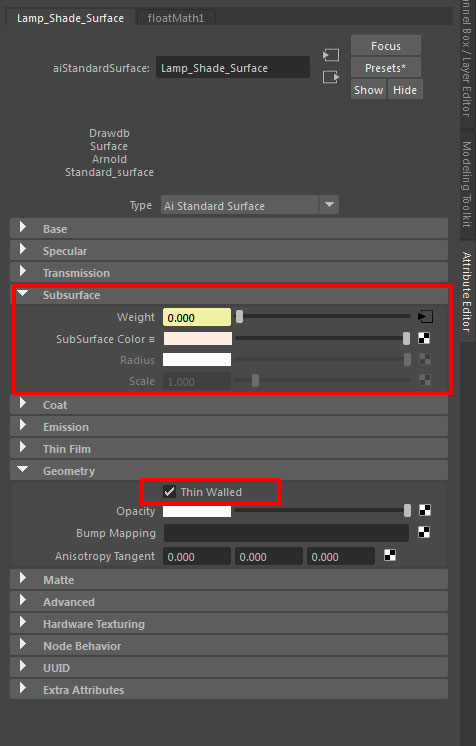
The Subsurface component of the Arnold Standard Surface shader (aiStandardSurface) controls Sub Surface Scattering (SSS).
When the ‘Thin Walled’ option is checked in the Geometry attributes of the shader, the Subsurface isn’t rendered as a full volume of material like soap or skin/flesh (the effect that is traditionally called Subsurface Scattering – SSS) but as a thin paper-like translucent surface like paper, thin cloth thin leaves, lamp shades etc. (the effect traditionally called Translucency or ‘Paper Shader’)

* Note that this option is suitable mainly for polygon surfaces without thickness (just one side)

Untitled-1

To create a Translucent shader with Arnold:

Subsurface Weight must be higher than 0.0 for the effect to be computed.

In Geometry, check Thin Walled for the SSS to be rendered as Translucency (Paper Shader).

Extra options:

Use samplerInfo Node Facing Ratio output in Subsurface weight to add realism by changing the weight by angle.

Multiply weave texture with Facing Ratio to simulate fabric translucency.

Untitled-3.jpg

Related:
> Understanding Transparency Render Settings
> Arnold Transmission Scattering
> Arnold Refractive Caustics

Non-Color texture data in Cycles render

Software:
Blender 2.78

When loading texture files into a Cycles Image Texture node, it’s a good idea to take a moment to set the Color Space parameter correctly.
This parameter sets how the color data is intended to be used in the shader, that is, if it will be used as ‘Color’ like a Diffuse texture for example, or as ‘Non-Color Data’ like a Normal map texture example.

NRM_Wrong

NRM_Correct

The reason behind this is that texture data encoded in sRGB color space (JPG, PNG,..) intended to be used as color should be ‘linearized’, that means the gamma correction sRGB files are automatically encoded with should be removed, so the the color data will represent linear color values suitable for the processing of shaders and compositing the final rendered image*,
While texture data intended to be used as data like height or direction or percentage, shouldn’t be linearized, assuming that the colors were saved without adding a gamma corrections to them.

A common example of that is when using a normal map stored in PNG format,
When the Color Space parameter is set to ‘Color’ the resulting bump normal might look wrong, and also display hard edges along UV coordinates seams.
Setting the Color Space to ‘Non-Color Data’ will solve the problem and interpret the bump normals correctly.

> usage of a texture as input for a non-color parameter like displacement will automatically use it as linear color.

> 32 bit float formats like exr are automatically interpreted as linear color by the renderer (the viewport material display will still show a differance so it’s better to set it to ‘Non-Color Data’ anyway).

> It should also be noted that Blender has two parameters controlling the interpretation of an image file one in the Image Texture Node that controls the color usage, one in the Node properties that controls how the file format is interpreted,
And also general color management settings that control the display of colors and saving of image files.

> It should also by noted that I’m still baffled by Blender / Cycles color management.. 🙂

* Linear color is also suitable for post rendering / post production compositing for image development and VFX.